Fanatics Cert Lookup for Old and New Hologram Support
CheckCOA is the all-in-one, free Fanatics cert lookup: scan your Fanatics QR code to verify the authenticity of your signed memorabilia, with both the old and new Fanatics holograms supported. Scan the Dynamic QR code and enter the randomized 3-letter KeyCode, or type the Unique ID (UID) and KeyCode, and every result is screened against our Fraud Base of known fake, stolen, reused or compromised numbers, with 25+ authentication providers supported.
Checking more than Fanatics? CheckCOA also verifies PSA/DNA, JSA, Beckett BAS, SGC Authentic, Upper Deck and 20+ more autograph providers in one place.
Scan the Fanatics Dynamic QR code, or enter the Unique ID (UID) from the sticker. New holograms also need the randomized 3-letter KeyCode revealed by tilting the sticker.
The Fanatics hologram: Dynamic QR, UID and KeyCode
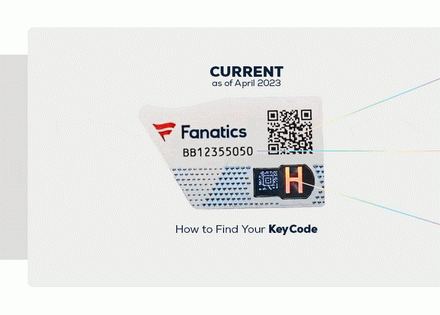
The current Fanatics Authentic sticker carries three verification elements. Scan the Dynamic QR code and enter the KeyCode to confirm authenticity in minutes, or verify the Unique ID together with the KeyCode. CheckCOA reads all three and checks the number against Fraud Alerts.
Dynamic QR code
Scan it with your camera and enter the randomized 3-letter KeyCode to verify the collectible in minutes.
Unique ID (UID)
The printed serial on the sticker. Combined with the KeyCode, it verifies the authenticity of your collectible.
KeyCode
A randomized 3-letter code that can be entered in any order, revealed by adjusting the viewing angle of the sticker.
Old and new Fanatics holograms are both supported
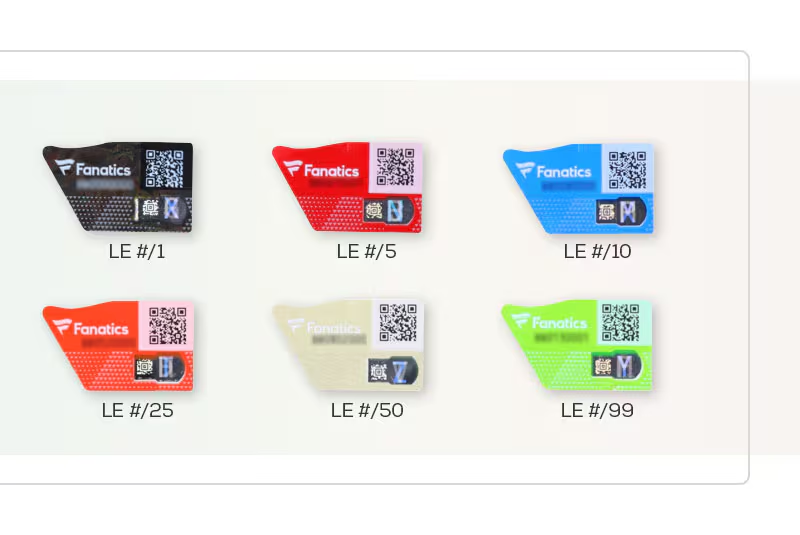
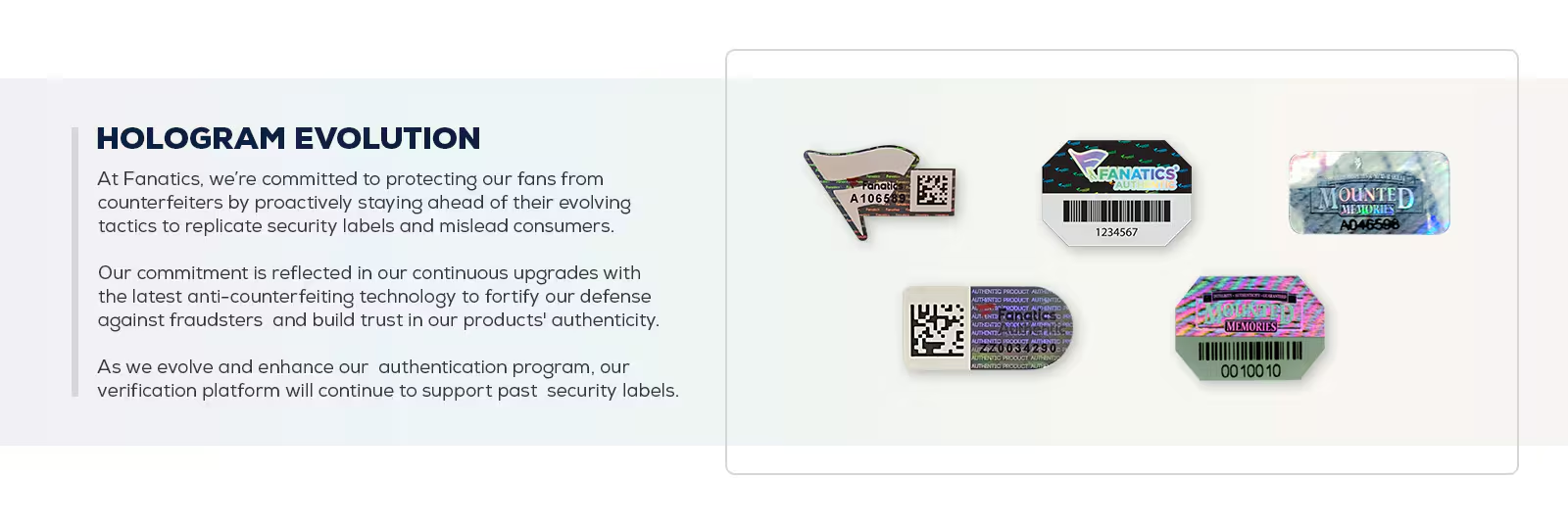
Fanatics upgrades its anti-counterfeiting labels over time, including newer color-coded holograms tied to limited-edition counts. CheckCOA supports both the current sticker and past Fanatics and Mounted Memories security labels, so you can verify older and newer certificates in the same place.
How to find your KeyCode
The KeyCode is hidden on the sticker and appears when you tilt it. Adjust the viewing angle to reveal the randomized 3-letter code, then enter it in any order. If the camera cannot read the QR, type the Unique ID and KeyCode manually.
Fanatics lookup plus extra fraud protection
A standard provider lookup can confirm whether a Fanatics record is available. CheckCOA adds an all-in-one workflow with QR scan, camera scan, image OCR, manual entry, saved history and Collections, plus Fraud Alert checks against known fake, stolen, reused or compromised certificate numbers.
Provider lookup
- Checks Fanatics records when available
- Shows certificate data when returned
- One provider at a time
CheckCOA
- Checks Fanatics records when available
- Reads the QR, UID and KeyCode, plus camera, OCR and manual entry
- Supports old and new hologram formats
- Adds Fraud Alert checks against 25,000+ reported records
- Also verifies PSA/DNA, JSA, Beckett, SGC and 20+ more providers
Fraud Alert checks for Fanatics certificates
A real-looking hologram or QR code does not always mean the item is safe. Copied stickers, reused numbers and counterfeit labels appear in online marketplaces. CheckCOA screens every Fanatics cert lookup against a growing database of more than 25,000 reported fake, stolen, reused and compromised certificate numbers so collectors can avoid already-reported risks before buying.
A clean result is not a guarantee of authenticity. Always compare the sticker, signature, item photos and seller history before buying.
Works for Fanatics Authentic signed memorabilia
Use this Fanatics cert lookup before you buy or sell. Compare the QR, Unique ID, KeyCode and returned record with the signed item in front of you, then review any Fraud Alert warnings for known fake or reused certificate numbers.
- Signed jerseys, photos and equipment
- Fanatics Authentic hologram stickers
- Dynamic QR + UID + KeyCode verification
- Older Fanatics and Mounted Memories labels
- Marketplace listing checks before purchase
- Collection history and wishlist organization
Verify a Fanatics hologram
Scan the QR code or enter the Unique ID and KeyCode, and screen the number with free Fraud Alert protection.
How to verify a Fanatics hologram, QR code and KeyCode
Scan the sticker's Dynamic QR code or enter the Unique ID, add the 3-letter KeyCode, then compare the returned record with the signed item.
How do I verify a Fanatics hologram?
Scan the sticker's Dynamic QR code with your camera and enter the randomized 3-letter KeyCode, or enter the Unique ID (UID) together with the KeyCode. CheckCOA checks the provider record when available and screens the number against Fraud Alerts. Compare the returned details with the signed item before you rely on the result.
What are the Dynamic QR code, UID and KeyCode?
The Dynamic QR code links to the collectible's record and is scanned to start verification. The Unique ID (UID) is the serial printed on the sticker. The KeyCode is a randomized 3-letter code, revealed by tilting the sticker, that can be entered in any order; combined with the UID it verifies authenticity.
Are older Fanatics holograms still supported?
Yes. Fanatics upgrades its security labels over time, and CheckCOA supports both the current hologram and past Fanatics and Mounted Memories labels, so you can verify older and newer certificates in one place.
Is the Fanatics cert lookup free?
Yes. Verifying a Fanatics certificate on CheckCOA is free and needs no account. Scan the QR, or enter the UID and KeyCode, to check the provider record when available and screen it against Fraud Alerts for known fake, stolen, reused or compromised numbers.
Where do I find the Fanatics number and KeyCode?
The Unique ID is printed on the Fanatics Authentic hologram sticker attached to the item; older items may also have a COA. The 3-letter KeyCode is hidden on the sticker and appears when you tilt it to change the viewing angle.
Why does a Fanatics lookup return no result?
Recheck the Unique ID and KeyCode, remove spaces, and confirm the sticker is a Fanatics Authentic label. A QR may be damaged even when the printed number is readable, and recently issued or older records may return fewer fields. If the record stays unavailable, request clear photos of the sticker and item and seek provider confirmation before a high-value purchase.
Does a matching Fanatics number prove the item is genuine?
No. A real number, sticker image or QR can be copied and reused with another item. Compare the signature, sticker placement, item photos and seller history, and use reverse-image search when photos look recycled. CheckCOA also screens the number against reported Fraud Alerts, but a clean result means only that no matching report is currently recorded.
Can CheckCOA help spot fake or reused Fanatics certificates?
Yes. Every Fanatics lookup is screened against CheckCOA's Fraud Alert database of 25,000+ known fake, stolen, reused and compromised certificate records. This helps flag known fake COAs, counterfeit slabs, reused serial numbers and other reported risk signals, but it does not replace expert authentication.
Verify Autographs & Graded Cards - All in One Place
All-in-one cert lookup across PSA, Beckett, CGC, Upper Deck, BGS and 20+ more. Every scan is auto-checked against our growing Fraud Alert database - 25,000+ known fake, stolen, reused & compromised certificates.