Panini Authentic Lookup: Verify a Hologram or COA Number
Use this free Panini Authentic lookup to verify a Panini hologram, authentication or COA number in seconds. Panini Authentic secures signed trading cards and memorabilia with a serialized hologram, and that hologram number is what confirms the item against Panini's records. Enter it with the PA prefix or just the digits, because CheckCOA accepts both and normalizes the number for you. Every check is screened against our Fraud Base of known fake, stolen, reused or compromised numbers, with 25+ authentication providers supported in one place. CheckCOA is independent and not the official Panini site.
Checking more than Panini? CheckCOA also verifies PSA/DNA, Beckett BAS, JSA, Fanatics, Upper Deck (UDA), TRISTAR, SGC Authentic and 20+ more autograph providers in one place.
Enter the Panini hologram number from the sticker on the item, or the number on the COA. You can type it with the PA prefix or without it, and you can scan the QR, upload a photo or enter it manually.
What is Panini Authentic?
Panini America is one of the largest trading card manufacturers in the hobby, and Panini Authentic is the side of the business that covers signed memorabilia and authenticated collectibles. Items that pass through the program are secured with a serialized Panini Authentic hologram, and that hologram number is the identifier collectors use to confirm the item against Panini's records before buying or selling.

- Serialized Panini Authentic hologram on the item
- Hologram number is the primary verification identifier
- Covers signed trading cards and memorabilia
- COA supplied alongside the autographed item
- Commonly checked before a marketplace purchase
How to read your Panini hologram number, with or without the PA
Panini Authentic hologram numbers are usually printed with a PA prefix followed by digits, for example PA1234567. Panini's own hologram lookup asks you to leave the PA off and enter only the digits, which is easy to miss and a common reason a search appears to fail. CheckCOA accepts either form: type PA1234567 or 1234567 and the lookup runs the same way, then displays the result in the standard PA format. That also means the same item resolves to a single record in your History no matter which way you entered it.
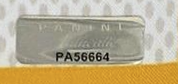
Find the hologram
Look for the serialized Panini Authentic hologram sticker on the item, and the matching number on the COA.
Enter it either way
PA1234567 or 1234567 both work here. CheckCOA strips the prefix for you before checking the record.
Match and compare
Compare the returned athlete, item name and description against the item and the COA in front of you.
Why a "Public" hologram returns no result
Panini states that holograms marked "Public" are not searchable in its database. For those items, authentication is provided by the corresponding COA supplied with the autographed item rather than by an online record. So if your Panini lookup comes back empty and the hologram is a "Public" one, that on its own does not mean the item is fake. It means this particular hologram type was never intended to resolve online, and the COA that came with the item is the document to examine instead.
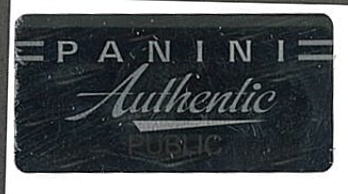
Check the hologram type
"Public" holograms are excluded from Panini's searchable database by design.
Use the COA instead
For "Public" items Panini provides authentication through the COA that ships with the autographed item.
Still compare everything
Examine the COA, the hologram, the signature and the seller's photos together rather than relying on one signal.
The photo you see is the edition photo, not your item
When a Panini hologram number resolves, the record returns a product photo and description. Panini notes that this photo represents the overall edition, and that an individual autographed item may vary slightly from the image shown. This matters when you are checking a listing: a matching photo confirms which product the hologram belongs to, not that the specific item in the seller's hands is the one pictured. Treat the image as a product reference and keep comparing the actual signature, hologram and item photos before you buy.
A returned photo shows the edition, not your individual item. Do not treat "the photo matches" as proof on its own, and always ask for clear close-up photos of the actual item and its hologram.
Panini hologram lookup plus extra fraud protection
A standard Panini hologram lookup can confirm the product record tied to a hologram number when one is available. CheckCOA brings that into an all-in-one verification workflow and adds a safety layer: Fraud Alert checks against known fake COAs, copied certificate numbers, reused numbers and compromised records.
Standard Panini lookup
- Requires the number without the PA prefix
- Returns the edition photo and product description
- "Public" holograms are not searchable
- Focused only on Panini Authentic items
CheckCOA
- Accepts the number with or without the PA prefix
- Checks Panini records when available
- Supports QR scan, camera scan, image OCR and manual entry
- Adds Fraud Alert checks against 25,000+ reported records
- Saves results to History, Collections and Wishlist
- Also supports PSA, Beckett, JSA, Fanatics, Upper Deck and 20+ more providers
Fraud Alert protection and Panini hologram red flags
Counterfeit and reused holograms and copied certificate numbers appear on marketplace listings, especially for high-value signatures. A number can even match a real record while the sticker has been moved onto a different item. CheckCOA screens every Panini lookup against a growing database of known fake, stolen, reused and compromised certificate numbers to help reduce that risk.
- The hologram number does not match the number on the COA
- The sticker looks flat, peeled, reapplied or poorly printed
- The returned product description does not match the item being sold
- The same hologram number appears on multiple listings
- The seller avoids clear close-up photos of the hologram
- The seller offers the edition photo as proof of the exact item
- The price is unusually low for a high-value autograph
A clean result is not a guarantee of authenticity. New fakes appear every day, so always compare the signature, hologram, COA, item photos and seller history before buying.
Works for Panini Authentic signed memorabilia
Use this Panini Authentic lookup for autographed cards and memorabilia carrying a Panini hologram or Certificate of Authenticity, especially when checking marketplace listings or high-value signatures before purchase.
- Signed trading cards and autographed inserts
- Signed photos, balls, jerseys and equipment
- Panini Authentic holograms and COAs
- Marketplace and private-sale checks
- Collection history and wishlist organization
Verify a Panini hologram number
Enter the Panini Authentic hologram or COA number, with or without the PA prefix, and screen it with free Fraud Alert protection.
Panini certificate lookup guide
Use these practical checks to choose the right lookup, read the result and decide when the item needs closer review.
Is the Panini Authentic lookup free?
Yes. Verifying a Panini hologram, authentication or COA number on CheckCOA is free and needs no account. Enter or scan the number to check the provider record when available and screen it against Fraud Alerts for known fake, stolen, reused or compromised numbers.
Do I enter the Panini hologram number with or without the PA?
Either works here. Panini's own hologram lookup asks for only the digits without the PA prefix, but CheckCOA accepts PA1234567 and 1234567 alike, strips the prefix for you and displays the result in the standard PA format. The same item stays as one record in your History whichever way you type it.
Why does my "Public" Panini hologram return no result?
Panini states that "Public" holograms are not searchable in its database. For those items, authentication is provided by the corresponding COA supplied with the autographed item instead of an online record. An empty result for a "Public" hologram is expected behaviour, not evidence that the item is fake, so examine the COA, hologram and signature carefully.
Does the photo in the result show my exact item?
No. Panini notes that the product photo represents the overall edition, and an individual autographed item may vary slightly from the image shown. Use it to confirm which product the hologram belongs to, not as proof that the seller's specific item is the one pictured. Always ask for clear photos of the actual item and its hologram.
Where is the Panini hologram number?
On the serialized Panini Authentic hologram sticker attached to the item, and on the matching Certificate of Authenticity. It is normally a PA prefix followed by digits. Enter the number exactly as shown, or leave the PA off if you prefer.
What is the difference between the Panini hologram number and the COA number?
For Panini Authentic items they are normally the same serialized number, printed on the hologram sticker and repeated on the Certificate of Authenticity. If the number on the hologram and the number on the COA do not match, treat that as a red flag and review the listing carefully.
Why does a Panini lookup return no result?
It can be a typo, a "Public" hologram that is excluded from the searchable database, or a record that is not available from the provider source. A no-result does not automatically mean the item is fake, but review the hologram, COA and item photos more carefully before buying.
Can I verify a Panini hologram from a photo?
Yes. CheckCOA supports QR scan, camera scan, image OCR and manual entry. Review the detected number before verifying, and note that OCR can misread a worn or angled hologram.
Is CheckCOA the official Panini lookup?
No. CheckCOA is an independent verification tool. It helps you check provider records when available, organizes your checks in one place, and adds Fraud Alert checks against known fake, stolen, reused or compromised numbers.
Can CheckCOA help spot fake or reused Panini certificates?
Yes. Every Panini lookup is screened against CheckCOA's Fraud Alert database of 25,000+ known fake, stolen, reused and compromised certificate records. This helps flag known fake COAs, counterfeit slabs, reused serial numbers and other reported risk signals, but it does not replace expert authentication.
Verify Autographs & Graded Cards - All in One Place
All-in-one cert lookup across PSA, Beckett, CGC, Upper Deck, BGS and 20+ more. Every scan is auto-checked against our growing Fraud Alert database - 25,000+ known fake, stolen, reused & compromised certificates.