MLB Authentication Lookup (Hologram Sticker Verification)
Run a free MLB cert lookup on any MLB authentication hologram before you buy. Enter the two-letter prefix followed by the hologram number, for example CV123456, or scan the QR code on the newer sticker. Holograms that begin with PX or YP also carry a three-letter validation code, and CheckCOA asks for it automatically so the lookup goes through. Every result is screened against our Fraud Base of known fake, stolen, reused or compromised numbers, with 25+ authentication providers supported in one place. CheckCOA is independent and not the official MLB Authentication site.
Checking more than MLB? CheckCOA also verifies PSA/DNA, JSA, Beckett BAS, Fanatics, Upper Deck, SGC Authentic and 20+ more autograph and memorabilia providers in one place.
Enter the two-letter prefix followed by the hologram number, for example CV123456. If the number starts with PX or YP, a field for the 3-letter validation code appears below.
How to look up an MLB authentication hologram number
Every item authenticated under the MLB Authentication Program carries a tamper-evident hologram with a unique alphanumeric combination. The number you enter is the two-letter prefix plus the serial, run together with no space, like CV123456. On the newer sticker both parts sit side by side. On older holograms the two letters are often printed separately from the digits, sometimes below or beside them, so read the whole sticker before typing: the letters always go first.
1. Read the sticker
Find the two-letter prefix and the serial number. On newer holograms you can scan the QR code instead, which carries both.
2. Enter it as one string
Letters first, then digits, no spaces or dashes. If the prefix is PX or YP, add the three-letter validation code when the field appears.
3. Compare the record
Check that the returned player, item, team, event and date match the item and the listing in front of you.
The current MLB hologram: prefix, serial, validation code and QR
The hologram introduced in 2022 packs five separate elements onto one small sticker, and each of them tells you something. Knowing what they are makes it much easier to spot a sticker that is wrong, incomplete or lifted from another item.
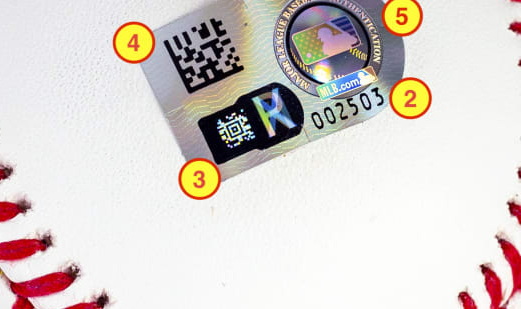
Two-letter prefix
A unique letter pair that identifies the hologram batch. It is the first half of what you type into the lookup.
Unique serial number
The number that, combined with the prefix, lets collectors cross-reference the item against the authentication database.
Validation code
Three randomized letters printed on the newer stickers. Prefixes such as PX and YP require it before the record will return.
QR code
Carries the prefix and the serial together, so scanning the sticker fills in the number without retyping it.
Silhouetted batter logo
The MLB batter silhouette marks the sticker as part of the Authentication Program rather than a licensing label.
Holograms starting with PX or YP need a validation code
MLB changed the hologram format, and the newer serials cannot be checked with the number alone. The validation code is not printed in plain ink: it sits in a small window that shows a different letter as you change the viewing angle, so you have to tilt the item to read all three. When you type a number that begins with PX or YP, CheckCOA shows an extra field for those letters, and the lookup only runs once all three are in. If you do not have the item in hand and the listing photo crops that window out, ask the seller for a straight-on close-up of the whole sticker before paying.

- PX and YP prefixes require the 3-letter validation code
- The code is printed on the hologram, next to the serial
- It is three randomized letters, entered exactly as shown
- Older prefixes verify with the letters and digits alone
- A listing photo that hides the validation code is worth questioning
Holograms used from 2006 to 2021
Most memorabilia in circulation still carries this generation. It shows a unique serial number that lets you cross-reference the item against the authentication database, the MLB silhouetted batter logo marking it as part of the program, and supporting authentication text. There is no QR code and no validation code on these, so the letters and digits are all you need.
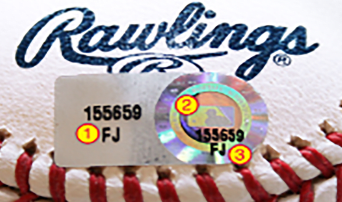
- Unique serial number for cross-referencing the item
- MLB silhouetted batter logo
- Supporting authentication text around the hologram
- No QR code and no validation code on this generation
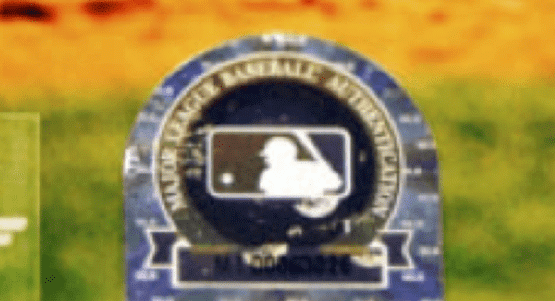
Holograms used from 2001 to 2005
The earliest stickers look noticeably different from anything issued since. During this period authentication under the program was handled solely by Deloitte and Touche. If you are looking at an item from the program's first years, expect this design rather than the modern sticker, and treat a modern-looking hologram on a 2001-era item as something to question.
The hologram is built to show if someone removed it
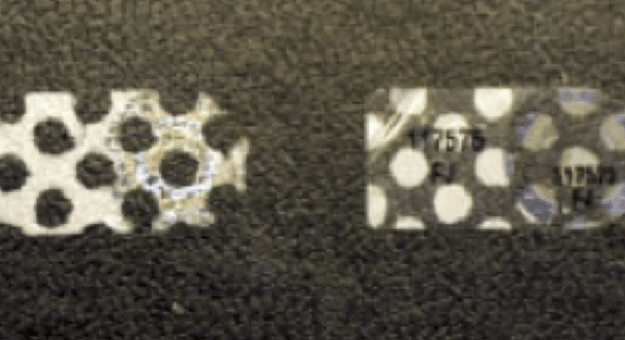
This is the detail most buyers never check, and it is one of the more useful things you can look at in a listing photo. MLB holograms are designed to break up if they are peeled off, leaving a visible honeycomb pattern behind on the sticker and on the surface it came from. A hologram that has been lifted from one item and pressed onto another rarely survives the move cleanly. If the sticker looks patchy, fragmented or shows that dotted residue, the number may be genuine while the pairing with the item is not.
What the MLB Authentication Program actually certifies
Launched in 2001, the MLB Authentication Program is the most comprehensive league-wide memorabilia authentication effort in professional sports, and it works differently from a submission-based authenticator. Off-duty law enforcement officers, working as independent contractors assigned by Authenticators, Inc., are present at every Major League Baseball game. Only items an authenticator personally witnesses being signed or used in a game are eligible. Once witnessed, the item receives a tamper-evident hologram produced by OpSec with its own alphanumeric combination. That is the key difference: the hologram records what an authenticator saw happen, so you cannot send an item in after the fact to have it added.
- Running since 2001, with millions of items authenticated
- Authenticators are on site at every MLB game
- Only signatures and game use witnessed in person are eligible
- Tamper-evident holograms produced by OpSec
- Covers game-used equipment, jerseys and autographed memorabilia
Holograms that will never appear in the MLB system
This is the single most common reason an MLB lookup comes back empty, and it usually means nothing is wrong with your item. Not every MLB hologram is an authentication hologram. Stickers whose numbers begin with DB mark an item as officially licensed, not authenticated, and they are never issued through the Authentication Program for autographed or game-used items. Separate licensing holograms are also produced for MLB Properties licensed products, again with their own alphanumeric combinations, and those will not appear in the authentication system either. Authentication holograms are applied directly to the item itself.
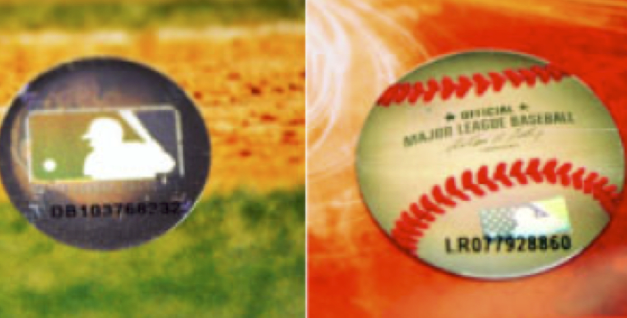
DB numbered holograms
A licensing designation confirming the product is officially licensed. It is not an authentication hologram and will not return a record.
Licensed-product holograms
Applied to MLB Properties licensed merchandise. They carry alphanumeric codes but sit outside the authentication database.
Authentication holograms
Applied directly to the authenticated item, with the batter logo and a serial that resolves in the program's records.
If the hologram is a genuine authentication sticker but the record is missing or the details look wrong, MLB asks collectors to email an image of the hologram along with a description and photo of the item to [email protected] so they can investigate.
What Team Issued means on an MLB record
A returned record sometimes describes the item as Team Issued, and collectors regularly read more into that than it says. Team Issued is a designation from an independent third-party authenticator attesting that the item was issued by the club to its clubhouse. It says nothing about whether the item was ever used in a game, worn by a particular player or used in any specific way. If the listing sells a Team Issued item as game-used, that gap between the record and the description is the thing to question.
MLB lookup plus extra fraud protection
A standard hologram lookup can confirm whether a serial resolves in the authentication records. CheckCOA brings that into one workflow across providers and adds a safety layer: Fraud Alert checks against known fake stickers, copied serials, reused numbers and compromised records.
Standard hologram lookup
- Checks the MLB authentication record when available
- Shows the returned item details
- Covers only MLB-authenticated items
CheckCOA
- Checks MLB records when available
- Supports QR scan, camera scan, image OCR and manual entry
- Prompts for the PX and YP validation code automatically
- Adds Fraud Alert checks against 25,000+ reported records
- Also supports PSA/DNA, JSA, Beckett BAS, Fanatics and 20+ more providers
Fraud Alert protection and MLB hologram red flags
A real hologram can be peeled off a low-value item and moved onto something being sold as a headline piece, and a genuine serial can be copied into a listing for a completely different item. CheckCOA screens every MLB lookup against a growing database of known fake, stolen, reused and compromised numbers to help reduce that risk.
- The returned player, item or event does not match the listing
- The sticker looks lifted, reapplied, creased or reprinted
- A honeycomb or dotted pattern shows the hologram was peeled off something
- The same hologram number turns up across several listings
- A Team Issued record is being sold as game-used
- The photo crops out the validation code or half the sticker
- The seller will not provide a straight-on close-up of the hologram
- The hologram is pristine on an item described as heavily game-used
A clean result is not a guarantee of authenticity. A genuine hologram can end up on the wrong item, and unreported misuse will not appear, so always compare the record with the physical item, the sticker and the seller's history.
Works for MLB authenticated memorabilia
Use this MLB cert lookup on anything carrying an authentication hologram, especially when you are checking a marketplace listing or an auction lot before you commit.
- Game-used baseballs, bats, bases and equipment
- Game-worn and team-issued jerseys and caps
- Autographed balls, photos and memorabilia signed under the program
- Milestone, debut and postseason game-used items
- Auction lots and marketplace listings before purchase
- Collection history and wishlist organization
Check an MLB hologram number
Enter the two-letter prefix and serial, add the validation code if the prefix asks for one, and screen it with free Fraud Alert protection.
How to read an MLB hologram and check the record
Start with the two letters and the serial on the sticker, add the validation code when the prefix asks for one, then compare the returned player, item and event with what you are actually looking at.
How do I look up an MLB authentication hologram number?
Enter the two-letter prefix followed by the hologram number as one string, for example CV123456, or scan the QR code on the newer sticker. If the number begins with PX or YP, also enter the three-letter validation code printed next to it. The lookup checks the authentication record when available and screens the number against Fraud Alerts, then compare the returned player, item and event with the item itself.
What does an MLB hologram number look like?
Two letters followed by a serial number, entered together with no space or dash, like CV123456. On the newer sticker the prefix and serial sit next to each other. On older holograms the two letters may be printed apart from the digits, above, below or beside them, but the letters still go first when you type the number.
My hologram starts with PX or YP and asks for a validation code. What is that?
MLB updated the hologram format, and those newer serials cannot be checked with the number alone. The validation code is three randomized letters, and they are not printed in plain ink: a small window on the sticker shows a different letter depending on the viewing angle, so you tilt the item to read all three. When you type a number starting with PX or YP, CheckCOA shows a field for it and runs the lookup once all three letters are entered. If a listing photo crops that window out, ask the seller for a full, straight-on picture of the sticker.
My item has a hologram that begins with DB, but I cannot find it in the system.
A DB numbered hologram is not an authentication hologram. It marks the item as officially licensed, and it is never issued through the MLB Authentication Program for autographed or game-used items, so it will not return an authentication record. Authentication holograms are applied directly to the item itself and carry the silhouetted batter logo.
Why does an MLB hologram lookup return no result?
The most common reasons are a misread character, a licensing hologram rather than an authentication hologram, or a missing validation code on a PX or YP serial. Recheck the letters and digits against a clear photo of the sticker, with no spaces. If it is a genuine authentication hologram and the record is still missing or the details look wrong, MLB asks collectors to email an image of the hologram plus a description and photo of the item to [email protected] for investigation.
What does Team Issued mean on an MLB record?
Team Issued is a designation from an independent third-party authenticator attesting that the item was issued by the club to its clubhouse. It is not a statement about whether the item was used in a game, or by whom. If a listing presents a Team Issued item as game-used, that difference is worth raising with the seller before you buy.
Who authenticates items under the MLB Authentication Program?
Off-duty law enforcement officers working as independent contractors, assigned by Authenticators, Inc., attend every Major League Baseball game. Only items they personally witness being signed or used in a game are eligible for the program. Witnessed items then receive a tamper-evident hologram produced by OpSec with a unique alphanumeric combination, which is why items cannot be submitted for authentication after the fact.
Is the MLB cert lookup free?
Yes. Checking an MLB authentication hologram on CheckCOA is free and needs no account, and every lookup includes a Fraud Alert check against known fake, stolen, reused and compromised numbers. A free account only adds History, Collections and Wishlist so your checks are saved.
Can I verify an MLB hologram from a photo?
Yes. Upload a clear photo and OCR will read the sticker, or scan the QR code on the newer holograms, which carries the prefix and serial together. Always review the detected number before verifying, because characters like 0 and O or 1 and I are easy to misread on a small sticker.
Does a matching hologram number prove the item is genuine?
No. The record confirms that the serial exists in the authentication system and what it was applied to. A genuine hologram can be peeled off one item and reapplied to another, and a real serial can be copied into a listing for something else. Compare every returned field with the physical item, check the sticker for signs of tampering, and review the seller's history before a high-value purchase.
Is CheckCOA the official MLB Authentication lookup?
No. CheckCOA is an independent verification tool. It checks provider records when available, keeps your checks across 25+ providers in one place, and adds Fraud Alert checks against known fake, stolen, reused or compromised numbers.
Can CheckCOA help spot fake or reused MLB Authentic certificates?
Yes. Every MLB Authentic lookup is screened against CheckCOA's Fraud Alert database of 25,000+ known fake, stolen, reused and compromised certificate records. This helps flag known fake COAs, counterfeit slabs, reused serial numbers and other reported risk signals, but it does not replace expert authentication.
Verify Autographs & Graded Cards - All in One Place
All-in-one cert lookup across PSA, Beckett, CGC, Upper Deck, BGS and 20+ more. Every scan is auto-checked against our growing Fraud Alert database - 25,000+ known fake, stolen, reused & compromised certificates.