OnlineAuthentics OA Number Lookup: Check a Registration Number
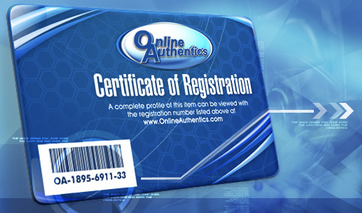
Run a free OnlineAuthentics lookup on any OA registration number before you buy. OnlineAuthentics works as an online registry for reviewed memorabilia: each item is recorded against a serialized number, and the Certificate of Registration that ships with it carries that number plus a barcode. Every internal item number begins with OA-, so this page fills that prefix in for you and you only type the digits. Grouping dashes are optional, which means OA-1895-6911-33, OA1895691133 and 1895691133 all resolve to the same record. Every check is screened against our Fraud Base of known fake, stolen, reused or compromised numbers, with 25+ authentication providers supported in one place. CheckCOA is independent and not the official OnlineAuthentics site.
Checking more than OnlineAuthentics? CheckCOA also verifies PSA/DNA, Beckett BAS, JSA, Fanatics, Upper Deck (UDA), TRISTAR, Panini and 20+ more autograph providers in one place.
The OA- prefix is already filled in, so type only the digits from your Certificate of Registration. The grouping dashes are optional: 1895-6911-33 and 1895691133 both work, and you can paste the whole OA-1895-6911-33 too.
Every internal item number starts with OA-
OnlineAuthentics numbers its internal items with an OA- prefix followed by a serial, and that is the number printed on the Certificate of Registration alongside a barcode. Because the prefix never changes, there is no reason to make you type it: this page shows OA- as already entered and takes just the digits. The certificate prints them in groups, like OA-1895-6911-33, but the groups are only there for readability. Type them with dashes or without, or paste the whole thing including the prefix, and the lookup normalizes it to one canonical number so the same item never turns into two separate records in your History.
Find the OA number
It is printed on the Certificate of Registration under the barcode, and referenced on the item's record.
Type only the digits
OA- is already in the field. Dashes between the groups are optional, so 1895-6911-33 and 1895691133 both work.
Compare the profile
A registered number returns the item profile. Check it describes the same object, signer and details the seller is showing.
What OnlineAuthentics actually is
It helps to be precise about what an OA number proves. OnlineAuthentics is best understood as an online registry and archive for memorabilia that has been reviewed, rather than a primary third-party authenticator in the mould of PSA/DNA or JSA. Its value to collectors is the durable digital profile: a serialized record that keeps the item's details, images and history in one place, tied to a tamper-evident number that can be looked up years later. That is genuinely useful for provenance, and it is why the number appears in so many listings. It is not the same thing as an authenticator's written opinion on the signature itself.
- An online registry and archive for reviewed memorabilia
- Serialized OA numbers with a Certificate of Registration
- Digital item profiles that persist and can be revisited
- Widely referenced in marketplace listings for provenance
- Best used alongside, not instead of, an authenticator's opinion
Why an OA number sometimes returns nothing
An empty result is not automatically a bad sign, and knowing why saves a lot of panic. OnlineAuthentics keeps more than one collection of records: alongside internal items, it maintains a separate database of items reviewed offline, and a number can exist in one and not surface in the other. Add the ordinary causes, a mistyped digit or a record the source is not returning right now, and most blank results have a dull explanation. What matters is what you do next: do not accept a seller's screenshot of a record as a substitute for the live lookup, and ask for the certificate and the item in the same photo.
Different record set
Internal items and offline-reviewed items are tracked separately, so a number may not surface in the search you ran.
A misread digit
Barcodes and small print invite errors. Recheck the digits against a sharp photo of the certificate before concluding anything.
Source availability
Provider records are not always returned. Retry later rather than treating one blank result as a verdict.
Is OnlineAuthentics legit?
OnlineAuthentics is a recognised and long-running name in the memorabilia world, and collectors value it for exactly what it does well: keeping tamper-evident, serial-numbered digital records of items, including pieces tied to well-known signers and exclusive partnerships. As with every certificate, though, a record is only as strong as the process behind it, and opinions in the hobby differ on how much weight any single COA should carry. The sensible position is the boring one. Treat a registered OA number as good supporting provenance, cross-reference it against the live registry rather than a seller's image, and judge the signature and the item on their own merits too.
OnlineAuthentics lookup plus extra fraud protection
A standard registry lookup can confirm whether a number has a record and what it says. CheckCOA brings that into one workflow across providers and adds a safety layer: Fraud Alert checks against known fake certificates, copied numbers, reused records and compromised entries.
Standard OA lookup
- Checks the OnlineAuthentics record when available
- Requires the number in the expected format
- Covers only OnlineAuthentics records
CheckCOA
- Checks OnlineAuthentics records when available
- Accepts the number with or without the OA- prefix and dashes
- Supports QR scan, camera scan, image OCR and manual entry
- Adds Fraud Alert checks against 25,000+ reported records
- Saves results to History, Collections and Wishlist
- Also supports PSA/DNA, Beckett BAS, JSA, Fanatics and 20+ more providers
Fraud Alert protection and OA red flags
A registration number is data, and data can be copied. A genuine OA number can be pasted into a listing for a completely different item, and a certificate card can be photographed once and reused across many sales. CheckCOA screens every OnlineAuthentics lookup against a growing database of known fake, stolen, reused and compromised numbers to help reduce that risk.
- The returned item profile does not match the object being sold
- The same OA number turns up across several listings
- The certificate photo is reused, cropped or clearly not current
- The seller shows a screenshot of a record instead of the number itself
- The certificate and the item never appear in the same photo
- The barcode or printed number looks altered or reprinted
- The price is far below the going rate for that signer
A clean result is not a guarantee of authenticity. A real number can be attached to the wrong item, and unreported misuse will not appear, so compare the record with the physical item, the certificate and the seller's history.
Works for OnlineAuthentics registered memorabilia
Use this OA lookup on anything carrying an OnlineAuthentics registration number or Certificate of Registration, especially when you are checking a marketplace listing before you pay.
- Signed photos, prints and posters
- Signed balls, gloves, jerseys and equipment
- Celebrity and sports memorabilia with a registered profile
- Items sold on with the original Certificate of Registration
- Marketplace and auction checks before purchase
- Collection history and wishlist organization
Check an OA registration number
The OA- prefix is already there. Type the digits from the Certificate of Registration and screen them with free Fraud Alert protection.
How to read an OnlineAuthentics registration number
Find the OA number on the Certificate of Registration, type the digits after the prefix, then compare the returned item profile with what the seller is actually showing you.
Where can I find the OnlineAuthentics COA number?
On the Certificate of Registration that ships with the item, printed under the barcode. Internal item numbers always begin with OA- followed by the serial, for example OA-1895-6911-33. Enter the digits exactly as printed, or paste the whole number including the prefix.
Do I need to type the OA- prefix?
No. Every internal item number starts with OA-, so the field already shows it and you type only the digits. Pasting the full number works too. The lookup normalizes whatever you enter to one canonical form, so the same item stays as a single record in your History however you typed it.
Does the number have to include the dashes?
No. The certificate prints the serial in groups purely for readability. OA-1895-6911-33, OA1895691133 and 1895691133 are all treated as the same number here.
Why does my OA number return no result?
OnlineAuthentics tracks internal items separately from items it reviewed offline, so a number can exist in one record set and not surface in the search you ran. A mistyped digit and temporary source availability are the other common causes. Recheck the digits against a sharp photo of the certificate, retry later, and never rely on a seller's screenshot of a record in place of a live lookup.
Is OnlineAuthentics legit?
It is a recognised, long-running name in memorabilia, and collectors value it as a registry that keeps tamper-evident, serial-numbered digital profiles of items. It is better understood as an archive and registration service than as a primary third-party authenticator like PSA/DNA or JSA. Treat a registered number as good supporting provenance and still judge the signature, the item and the seller.
Is the OnlineAuthentics lookup free?
Yes. Checking an OA number on CheckCOA is free and needs no account, and every lookup includes a Fraud Alert check against known fake, stolen, reused and compromised numbers. A free account only adds History, Collections and Wishlist so your checks are saved.
Can I scan the certificate from a photo?
Yes. Upload a clear photo and OCR will read the number, or type it manually. Review the detected digits before verifying, because barcodes and small print make characters easy to misread.
Does a matching OA record prove the item is genuine?
No. It confirms that the number has a registered profile and what that profile says. A real number can be copied into a listing for a different item, and a certificate card can be photographed once and reused across many sales. Ask for the certificate and the item in the same photo, and compare every returned field before a high-value purchase.
Is CheckCOA the official OnlineAuthentics lookup?
No. CheckCOA is an independent verification tool. It checks provider records when available, keeps your checks across 25+ providers in one place, and adds Fraud Alert checks against known fake, stolen, reused or compromised numbers.
Can CheckCOA help spot fake or reused OnlineAuthentics certificates?
Yes. Every OnlineAuthentics lookup is screened against CheckCOA's Fraud Alert database of 25,000+ known fake, stolen, reused and compromised certificate records. This helps flag known fake COAs, counterfeit slabs, reused serial numbers and other reported risk signals, but it does not replace expert authentication.
Verify Autographs & Graded Cards - All in One Place
All-in-one cert lookup across PSA, Beckett, CGC, Upper Deck, BGS and 20+ more. Every scan is auto-checked against our growing Fraud Alert database - 25,000+ known fake, stolen, reused & compromised certificates.